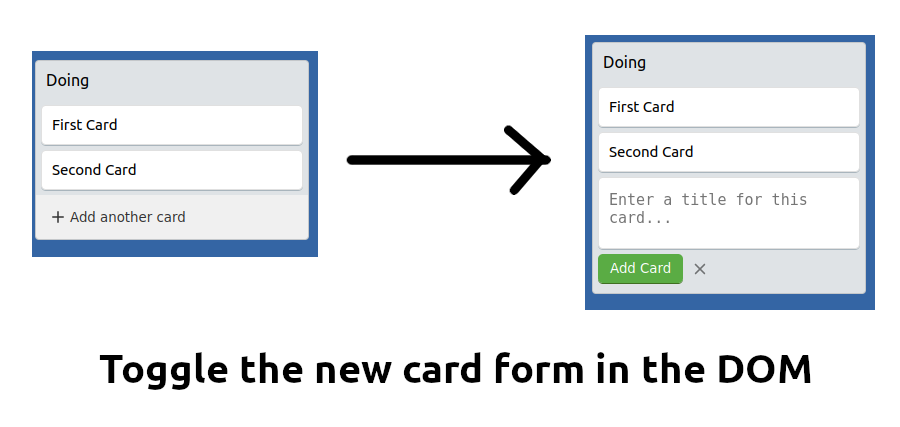
Building a Trello Clone in Common Lisp
In this post we are going to build a Trello clone demo application in Common Lisp. It is just a demo app without any authentication or persistence, it’s going to focus mainly on the routing, user experience and api mechanisms. We are going to use a couple of JavaScript libraries to enhance the user experience like drag-n-drop, inline forms, etc.,
Boards
First we are going to construct our Trello board from two lists namely To Do
and Doing, each containing two cards. We are going to create a list of property lists
for this.
;; Boards
(defvar *board* '((:name "To Do" :id 1 :cards ((:id 1 :label "First Card" :list 1)
                                                (:id 2 :label "Second Card" :list 1)))
                   (:name "Doing" :id 2 :cards ((:id 3 :label "First Card" :list 2)
                                                (:id 4 :label "Second Card" :list 2)))))
Home page route
Next we are going to pass down this board to our home page, so that the lists and
cards can be rendered. This is how our home page route is going to look like:
;; Home page
(defroute "/" ()
  (render #P"index.html" (list :board *board*)))
Creating New List
Now we are going to focus on creating a new list on the board. We have a button called
+ Add another list in our page, by clicking on it you will get an inline form asking you
for a name for the new list and when you press add , a new list will be created and added to
the board.
To create this inline form we have two approaches:
- Create a single form anywhere in the page, hide it by default and place it inside add another list button by replacing the button.
- Get the HTML for the new list form, from the server and replace the button with the newly obtained HTML fragment.
There are pros & cons for each of the above approaches. First let’s discuss the disadvantages of the first approach.
We need to store the markup for the new list form inside our page. Then, on click of the + Add another list button,
we have to do some manual DOM manipulation. Like, first we have to hide our button, then we need to show the form in
place of the button, once the list is created and submitted we have to do the reverse process.
I definitely won’t recommend the first approach, since it is not an efficient way to do things and it kind of feels like more primitive method of creating an inline form experience for the user. You may think what is different with the second approach is it somewhat more like the first one, the only difference is you are getting the HTML from the server and swap it in the DOM. Still, you have to manipulate the DOM.
But there is a catch here, first we are not going to directly manipulate the DOM in the second approach. Since this is kind of a recurring pattern in UI, like swapping parts of the DOM on some user events and reverting back once the user is done with updating or submitting the form. I am going to make use of an awesome library with a clean and declarative approach of manipulating the DOM on user events by using HTML fragments obtained from the server. The name of the library is called htmx.
htmx allows you to access AJAX, CSS Transitions, WebSockets and Server Sent Events directly in HTML, using attributes, so you can build modern user interfaces with the simplicity and power of hypertext. It is small (~10k minified and gzipped), dependency-free, extendable and IE11 compatible.
This is how we are going to do that. The below fragment is our original markup for the + Add another list button.
<div id="add-list" class="add-list-button" hx-get="/lists/add" hx-swap="outerHTML" hx-target="#add-list">
  {% include "svg-plus.html" %}
  Add another list
</div>
Notice the new attributes starting with hx-, they are the special htmx attributes that let you send AJAX requests to the server and get the HTML fragments and swap them automatically based on your target. In our case, we are sending a GET request with the hx-get attribute to the url /lists/add and swap the response with the outerHTML property of our target #add-list provided through the hx-swap and hx-target attributes.
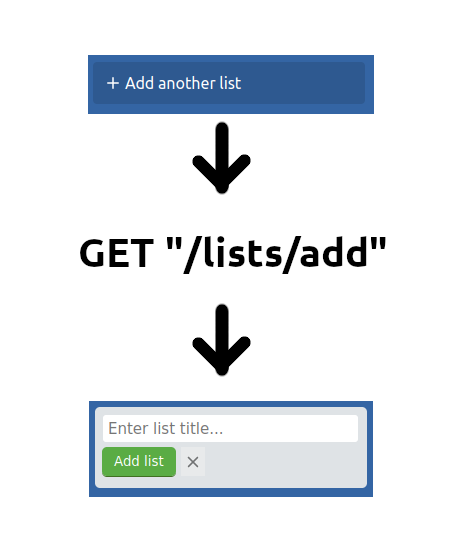
The new markup response from the server will look something like this:
<div id="add-list" class="add-list-editor">
  <form hx-post="/lists" hx-target="#board">
    <div class="list-title-edit">
      <input class="list-title-textarea" type="text" maxlength="30" name="name" placeholder='Enter list title...' autofocus="true">
    </div>
    <div class="edit-buttons">
      <button class="edit-button" type="submit" tabindex='0'> Add list</button>
      <button class="edit-button-cancel"
        type="button"
        tabindex='0'
        hx-get="/lists/cancel"
        hx-target="#add-list"
        hx-swap="outerHTML"
        >
        {% include "svg-close.html" %}
        </button>
    </div>
  </form>
</div>
Route for creating new list:
;; Add new lists
(defroute ("/lists" :method :POST) (&key _parsed)
  (let* ((name (get-param _parsed "name"))
	(new-list (list :name name :id (+ 1 (length *board*)) :cards ())))
    (setf *board* (append *board* (list new-list)))
    (render #P"_board.html" (list :board *board*))))
Route for cancelling new list addition:
;; Cancel add list
(defroute "/lists/cancel" ()
  (render #P"_new-list.html"))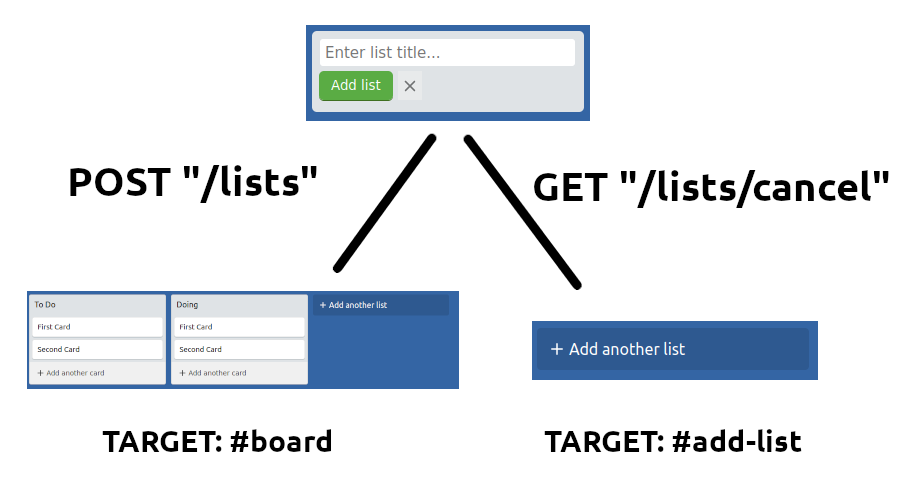
Adding a new Card
<div class="edit-card hidden" id="add-card-{{list.id}}">
  <div class="card">
    <textarea
      class="edit-card-textarea"
      name="label-{{list.id}}"
      placeholder="Enter a title for this card..."
      maxlength="300"
      autofocus=true
      ></textarea>
    <input type="hidden" name="listId" value={{id}}>
  </div>
  <div class="edit-buttons">
    <button
      class="edit-button"
      type="button"
      tabindex="0"
      hx-post="/cards/new/{{list.id}}"
      hx-target="#list-{{list.id}}"
      hx-swap="beforeend"
      hx-params="label-{{list.id}}"
      _="on htmx:afterOnLoad toggle .hidden on #add-card-{{list.id}} toggle .hidden on #btn-add-card-{{list.id}}"
      > Add Card
    </button>
    <div
      class="edit-button-cancel"
      tabindex="0"
      _="on click toggle .hidden on #add-card-{{list.id}} toggle .hidden on #btn-add-card-{{list.id}}"
      >
      {% include "svg-close.html" %}
    </div>

  </div>

</div>